What Is Grain Facility Automation? A Complete Guide for Modern Grain Operations
Grain facilities today are exploring new ways to improve efficiency, accuracy, and throughput while dealing with labor constraints and higher operational demands. One of the most transformative changes in the industry is grain facility automation.
This guide explains what grain facility automation means for modern grain operations, how it works in practice, and the key benefits facilities can see when they adopt automated tools and workflows.
Defining Grain Facility Automation
Grain facility automation refers to systems and processes that reduce manual tasks and human intervention throughout grain receiving, weighing, recording, and reporting processes. These solutions can improve operational consistency, reduce errors, and make data available in real time.
Automation in grain operations includes technologies such as unattended scale systems, electronic data capture, programmatic workflows, and seamless integration between key systems.
For a broader view of how modern grain software supports these tools see the Features page.
How Automation Works in Grain Operations
Automation in grain facilities replaces routine manual steps with programmed processes. Some of the key elements include:
Automated scale ticketing
Automated systems capture weight, vehicle, and transaction data without requiring manual ticket writing or data entry.
Driver check-in systems
Tools such as kiosks and RFID scanning help drivers confirm identity and complete check-in without waiting for staff assistance.
Real-time data integration
Automated data flows connect scale systems to accounting, reporting, and inventory systems so that information moves once instead of being reentered.
These automated flows reduce redundant tasks and promote consistent data across operational systems.
Unattended Scale Systems in Grain Automation
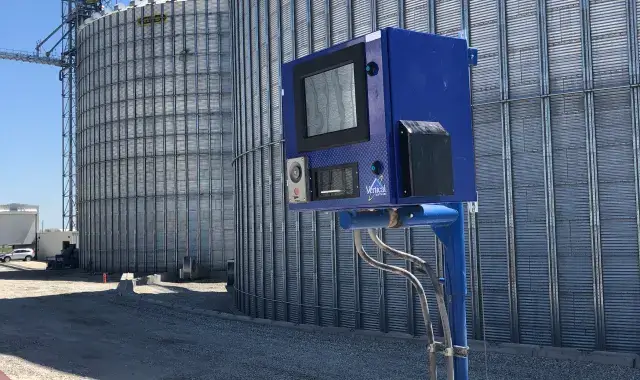
Unattended scale systems are central to many automation strategies. These systems allow grain facilities to process scale transactions without on-site staff at every weigh station. Unattended machines typically handle:
- Weight capture
- Vehicle identification
- Ticket printing
- Data transmission to backend systems
This type of automation improves the pace of grain receiving and supports continuous operations during peak periods.
Learn more about this model on the Unattended Grain Scale Ticketing page.
Why Grain Facility Automation Matters
Grain facility automation drives value in several areas:
Increased throughput
Facilities can handle more trucks in less time because routine tasks no longer require manual execution.
Improved accuracy
Electronic capture of scale, delivery, and driver data reduces the potential for human error.
Better data flow
Real-time integration with accounting and inventory systems reduces delays and supports more informed decision making.
Using these tools in combination can lead to smoother harvest operations and fewer manual touch points.
Integration With Core Grain Workflows
Automation does not operate independently. It supports and enhances core grain workflows related to:
- Scale ticketing including both attended and unattended systems
- Accounting where transaction accuracy matters
- Reporting so that operations can be monitored and analyzed
- Inventory management across bins and locations
This integrated approach results in a more connected facility where data flows seamlessly from capture to use.
For additional context, explore the Grain Accounting Software page and the Grain Reporting Software page.
Operational Benefits of Automation
Facilities adopting automation consistently report several operational improvements:
Faster receiving lines
Drivers spend less time waiting and more time moving through the system.
Lower labor burden
Staff can focus on exception management and higher value tasks rather than routine data entry.
Consistent procedures
Automated systems perform the same steps every time which promotes predictability and reliability.
These benefits help facilities respond to seasonal peaks and daily fluctuations more effectively.
Challenges and Considerations
While automation offers many benefits, adopting these tools also involves thoughtful planning:
Connectivity requirements
Automation relies on stable networks so data can flow across systems.
Change management
Staff may need guidance to adapt to new procedures and technologies.
Infrastructure upgrades
Some facilities may need hardware updates to support modern automation tools.
Understanding these considerations up front helps ensure a smoother transition and adoption.
Making the Most of Automation
To get the highest value from automation, facilities should:
- Map current workflows before making changes
- Identify bottlenecks where automation adds the most value
- Ensure integrations exist between systems such as accounting and reporting
- Provide training and documentation for staff
This approach helps facilities adopt automation thoughtfully and get the most benefit from the investment.
The Future of Grain Facility Automation
Automation continues to evolve as technology advances. Facilities that adopt automation early may see long-term advantages as industry standards shift toward real-time data, connected workflows, and reduced manual touch points.
For more on how automation fits within a complete grain software ecosystem explore Automation and consider how these capabilities can support your operational goals.
If you would like to learn more about automation strategies or discuss how these systems can complement your existing tools visit our contact page.